# Como alterar o nome dos email de disparos
Neste tutorial vamos lhe mostrar como alterar o nome dos e-mails que seus leads recebem através de sua máquina de emails.
### **Acessando sua conta de e-mail**
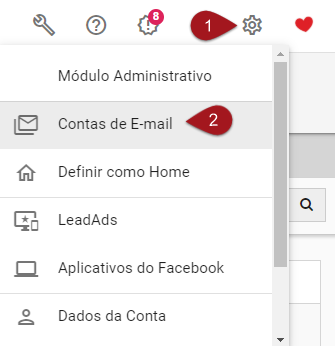
**Nº1–** Clique em Configurações
Nº2– Clique em Contas de E-mail
[](https://legado.leadlovers.site/wp-content/uploads/2020/09/t1-64-1.png)
Nº3– Clique em cima do e-mail que deseja alterar o colocar um nome.
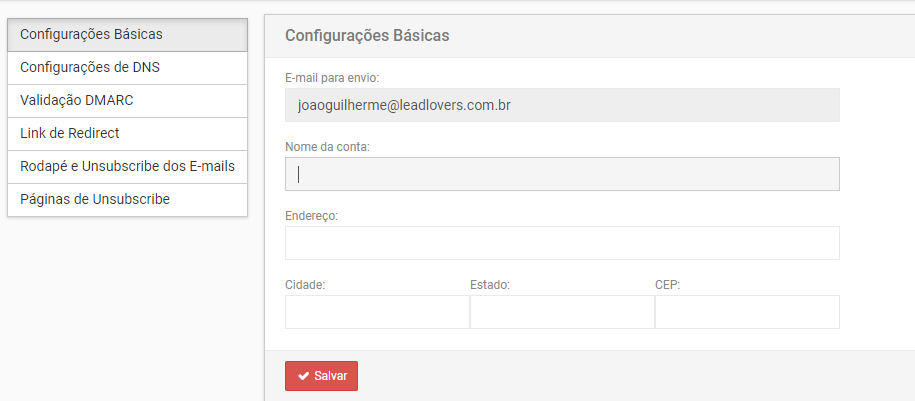
Nº4– Abrirá uma nova janela, em **configurações básicas**, altere o **nome da conta.**
Nº5– Depois clique em salvar.
**Pronto, agora seu e-mail de disparos já está com um nome configurado!**
**Suporte**\
Se surgir qualquer dúvida ou situação, ou se precisar de qualquer ajuda durante este procedimento, por favor, entre em contato com o nosso suporte!
---
# Agent Instructions: Querying This Documentation
If you need additional information that is not directly available in this page, you can query the documentation dynamically by asking a question.
Perform an HTTP GET request on the current page URL with the `ask` query parameter:
```
GET https://central.ajudaleadlovers.com/automacoes/maquinas/maquina-de-email/como-alterar-o-nome-dos-e-mail-de-disparos.md?ask=
```
The question should be specific, self-contained, and written in natural language.
The response will contain a direct answer to the question and relevant excerpts and sources from the documentation.
Use this mechanism when the answer is not explicitly present in the current page, you need clarification or additional context, or you want to retrieve related documentation sections.